


On this page
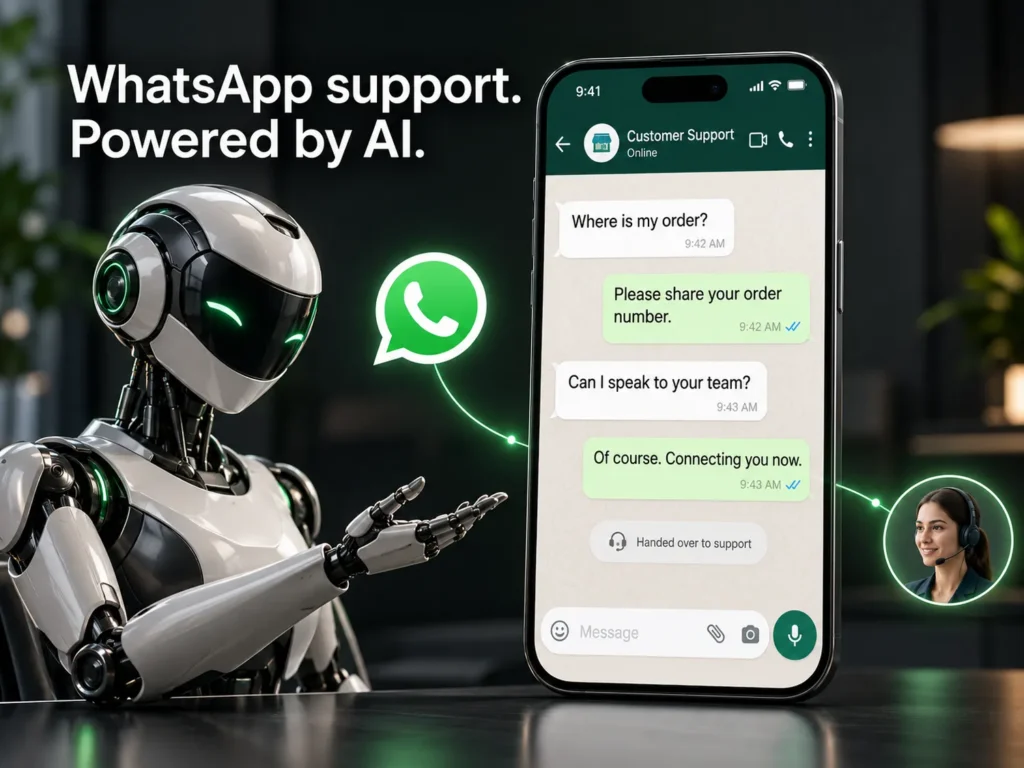
What is a WhatsApp AI assistant? It is software connected to your WhatsApp Business number that reads customer messages, answers common questions from information you approve, looks up details such as order status, and passes the chat to a person when it is unsure or when the customer asks for one. A good WhatsApp AI chatbot shortens waiting time without hiding your team.
In many markets, including Pakistan and the Gulf, customers expect to reach a business on WhatsApp the way they once expected a phone number. The problem is volume: the same ten questions arrive all day, and replies slow down when your team is busy. An assistant takes that repeated layer and leaves the human work to people.
Why do customers prefer WhatsApp for support?
The app is already on their phone, it feels informal and fast, and they do not have to wait on hold or open a web form. They can send a photo, a voice note or an order number and carry on later. For a business, that means fewer missed enquiries and a clear written record of every conversation.
What should an AI assistant answer, and what should it not?
Give the assistant questions with clear, stable answers, and keep judgement calls with your team.
| Message type | Who answers | Example |
|---|---|---|
| Common question | AI assistant | What are your delivery times? |
| Order lookup | AI assistant with order data | Where is order 1042? |
| Sales enquiry | AI qualifies, person follows up | Do you build Shopify stores? |
| Complaint | Person | My parcel arrived damaged. |
| Refund or exception | Person approves | Can I return this after 30 days? |
How does the handover to a human agent work?
Handover is the feature customers notice most. Decide the rules before you build anything. The assistant should pass the chat to a person when:
- The customer asks for a human, in any wording.
- The assistant is not confident in its answer, or fails twice in a row.
- The message is angry, urgent or about money, legal or health matters.
- The topic is outside the approved answers.
The person who takes over should see the full chat history and the customer record, so the customer never has to repeat themselves. Outside working hours, the assistant can say when a person will reply and collect the details in the meantime.
How do you connect WhatsApp to your CRM and orders?
A useful assistant is connected, not isolated. It looks up the order in your store, creates or updates the contact in your CRM and saves a short summary of the chat. For automated messages you use the WhatsApp Business Platform, which lets you reply freely within 24 hours of the customer's last message, and requires pre-approved message templates after that. Customers must also opt in before you send them business-initiated messages.
A minimal definition of the flow looks like this:
trigger:   new WhatsApp message
step 1:    check opt-in and the 24-hour window
step 2:    search approved answers and order data
step 3:    reply if confidence is high
fallback:  hand over to a person with the chat history
A good assistant answers fast when it knows and hands over fast when it does not.
uSpark delivery team
What does a safe launch checklist look like?
- Collect the 20 most common questions from real chats.
- Write approved answers in your own tone and keep them current.
- Set the handover rules and the working-hours message.
- Get opt-in and message templates approved for your number.
- Tell customers they are chatting with an AI assistant, and limit the data it can see.
- Test with your own team for a week, then launch to a small group and read transcripts weekly.
If you serve customers in the EU, check consent and data hosting against GDPR before launch. The same checklist works for AI agents behind the scenes, and an assistant that answers from your own files is explained in our guide to RAG chatbots.
Frequently asked questions
Is the WhatsApp Business API free?
No. Meta charges for business messages depending on the message type and country, and providers add their own fees. Pricing changes, so check Meta's current rates before you plan a budget.
Can the assistant understand voice notes and photos?
Many setups can transcribe voice notes and read images, but accuracy varies by language and accent. Test with real recordings from your customers before you rely on it.
Will customers be annoyed by a bot?
Not when it is fast, honest about being an assistant, and easy to leave. Customers get annoyed when they cannot reach a person, so make handover one message away.
How long does it take to launch?
A focused first version usually takes a few weeks. Most of that time goes into writing approved answers and testing the handover, not into code.
The bottom line
You do not need to answer every message yourself, and you do not need to hand everything to a bot. Start with the ten questions you answer most, connect the assistant to your orders, and keep a person ready for the rest. If you would like help planning it, talk to uSpark, and see our WhatsApp and customer support automation service, part of AI Agents and Automation.

uSpark Team
Engineering and strategyWe build websites, e-commerce stores, AI agents and API integrations for growing businesses, and write down what we learn along the way.
More from uSpark Team