


On this page
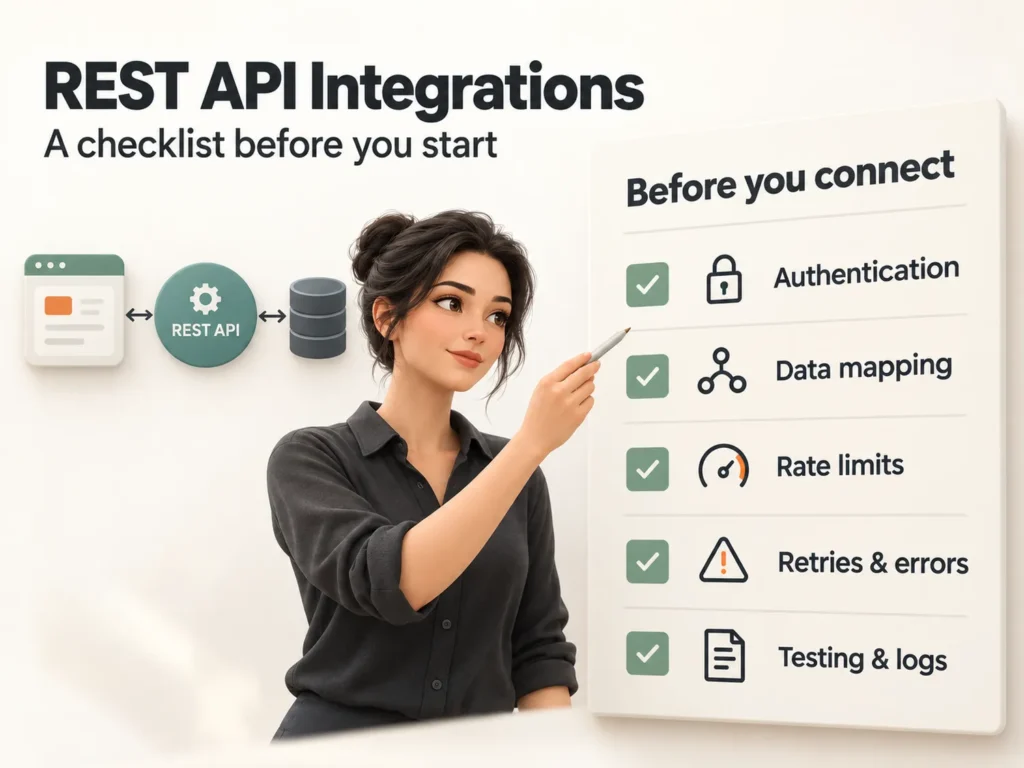
What should you settle before a REST API integration? Five things: how you will authenticate, what the API's rate limits are, how you will retry and handle errors, how fields map between the two systems, and how you will monitor the integration after launch. Skipping any one of them is the most common cause of rework in API integration projects.
An integration that works in a demo can still fail in real life, because real life brings slow responses, expired keys, duplicate records and changes you did not choose. This checklist is the one we run through before we write the first request.
What is an API integration, really?
An API integration lets two systems exchange data without anyone retyping it. A REST API does this over the web with standard methods: GET reads data, POST creates it, PUT or PATCH updates it and DELETE removes it, usually in JSON format. Your CRM, store, accounting tool and payment provider all offer one.
How should you handle authentication and permissions?
Authentication proves who is calling. The common options are an API key, a token and OAuth 2.0, which lets a user grant limited access without sharing a password. Whatever the method:
- Give the integration the smallest set of permissions it needs.
- Keep keys in environment variables or a secrets manager, never in code or in a shared document.
- Use separate credentials for testing and for live data.
- Rotate keys on a schedule and remove them when a person or project leaves.
How do you deal with rate limits, retries and errors?
Most APIs limit how many requests you can send. When you exceed the limit you get a 429 Too Many Requests response, often with a Retry-After header that says how long to wait. Your integration should respect it. A calm default looks like this:
auth:        OAuth 2.0, least-privilege scopes
rate limit:  stay under the documented limit, honour Retry-After
retry:       up to 3 attempts, exponential backoff with jitter
timeout:     10 seconds per request
on failure:  log it, alert the owner, park the record for review
Retry only requests that are safe to repeat, or use an idempotency key so a retry cannot create a second order or payment. Treat 4xx errors as problems with your request and 5xx errors as problems on their side, and handle them differently.
How do you map data and test it?
Two systems rarely describe the same customer in the same way. Write a mapping table that says which field becomes which, in what format, and what happens when a value is missing. Plan for dates, currencies, phone numbers, unique IDs, duplicates and paginated results.
| Check | Question to answer | Why it matters |
|---|---|---|
| Authentication | Key, token or OAuth, and which scopes? | Limits damage if a key leaks |
| Rate limits | How many requests per minute? | Avoids blocked or throttled calls |
| Errors and retries | What do we retry and what do we park? | Prevents lost or duplicated records |
| Data mapping | Which field maps to which? | Keeps data correct in both systems |
| Monitoring | Who is alerted, and how fast? | Failures are fixed, not discovered late |
Test in the provider's sandbox with messy data: missing fields, very long text, special characters and duplicates. Then test slow and failing responses on purpose. Where possible, prefer webhooks, where the other system tells you when something happens, over polling it every few minutes.
Assume every external API will one day be slow, change or fail, and design for that day.
uSpark delivery team
What should you monitor after launch?
- Log every call with a request ID, status code and duration.
- Alert on rising error rates, not only on total outages.
- Keep a dashboard of records synced, retried and parked.
- Follow the provider's changelog for version changes and deprecations.
- Document the integration so a new person can understand it in an hour.
Simple automations can start in a tool such as n8n; see which n8n workflows to automate first. For stores, payment and shipping connections are APIs too, so apply the same checks to your WooCommerce checkout, and compare platforms in WordPress vs Webflow if you are still choosing one.
Frequently asked questions
What is the difference between a REST API and a webhook?
With a REST API you ask the other system for data when you need it. With a webhook the other system sends you a message when something happens. Many integrations use both.
How long does an API integration take?
It ranges from days to several weeks. The time depends on the quality of the API documentation, the number of fields, how clean your data is and how much testing is needed.
Is an API key enough for security?
For a server-to-server connection with low risk, a well-protected key can be enough. Use OAuth 2.0 when the integration acts on behalf of individual users.
What happens when the API changes?
Good providers version their APIs and announce deprecations. Subscribe to the changelog, keep automated tests running and update on your schedule, not in an emergency.
The bottom line
A good integration is boring: it runs quietly, retries sensibly and tells you when something is wrong. Settle the five points above before you write code and you avoid most of the expensive surprises. If you would like help scoping an integration, talk to uSpark, and see our API Development and Integration service, part of API and System Integrations.

uSpark Team
Engineering and strategyWe build websites, e-commerce stores, AI agents and API integrations for growing businesses, and write down what we learn along the way.
More from uSpark Team